

Getting Started
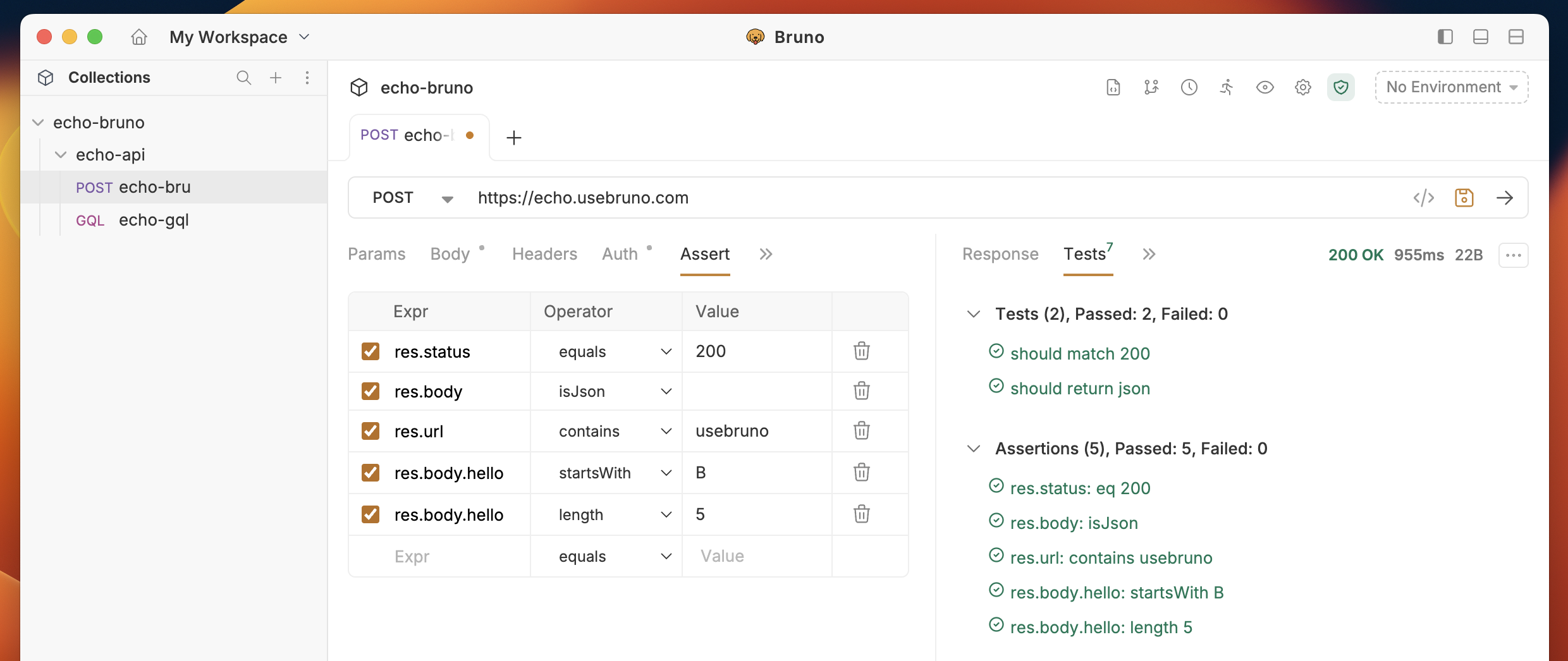
- Open a request and click on the Assert tab
- Add assertions by specifying:
- Expression: The value to test (e.g.,
res.status,res.body.id) - Operator: The comparison operator
- Value: The expected value
- Expression: The value to test (e.g.,
Common Examples
Basic Response Testing
| Expression | Operator | Value |
|---|---|---|
res.status | equals | 200 |
res.body.status | equals | success |
res.body.message | contains | created |
res.body.id | isNotEmpty |
Nested Objects
| Expression | Operator | Value |
|---|---|---|
res.body.user.profile.name | equals | John |
res.body.user.profile.email | contains | @example.com |
Arrays
| Expression | Operator | Value |
|---|---|---|
res.body.users | isNotEmpty | |
res.body.users[0].name | equals | Alice |
res.body.users[1].id | equals | 2 |
Using res() Query
For complex nested data, use theres() function:
| Expression | Operator | Value |
|---|---|---|
res('order.items[0].price') | equals | 29.99 |
res('..price') | isNotEmpty |
res() in Response Query docs.
Response Headers
| Expression | Operator | Value |
|---|---|---|
res.headers['content-type'] | contains | application/json |
Response Time
| Expression | Operator | Value |
|---|---|---|
res.responseTime | lt | 1000 |
Available Operators
- Comparison:
equals,notEquals,gt,gte,lt,lte - String:
contains,notContains,startsWith,endsWith,matches,notMatches - Type Checks:
isNull,isNotEmpty,isEmpty,isDefined,isUndefined - Value Checks:
isTruthy,isFalsy,isNumber,isString,isBoolean,isArray,isJson - Other:
in,notIn,between,length